Guide
How to set up Ignix and connect it to Claude
Account, first network, first post — and then handing the whole thing to an assistant that can do it for you.
This is the whole path, start to finish: from an empty account to asking an assistant “plan next week for Instagram” and having it actually happen. The first four steps take about ten minutes. The fifth takes two.
The part most people have not seen before is the last one. Ignix ships its own MCP server, which is the standard way an AI assistant connects to a tool. Once it is connected, Claude is not writing suggestions for you to copy — it is working inside your account, with your accounts, your calendar and your inbox.
You do not need it to use Ignix, and nothing in the first four steps depends on it. But it changes what the tool is, so it is worth the two minutes.
Create the account and confirm your email
Settings → Timezone
Sign up, confirm the email, and you are in. There is a short guided tour the first time that points out the main sections; you can skip it and replay it later from Settings, and it is per person, so replaying it does not reopen it for your team.
Nothing needs configuring before you can publish. Everything in Settings is optional except the timezone, which is worth a look now: it is what the calendar, the queue and every scheduled time use, and fixing it after you have queued a week is more annoying than setting it before.
Connect your first social account
My Accounts → Connect a new account
My Accounts is the first entry in the menu. Click “Connect a new account”, pick the network, log in on the network’s own page and approve the permissions. You come back and it is in the list.
Three things catch people out, and all three are the network’s rules rather than ours. Instagram needs a Business or Creator account — a personal one cannot publish through any API, ours included. Facebook connects Pages, not your personal profile: you log in as yourself, but what gets connected is the Page you administer. LinkedIn works the same way with company pages.
And if the wrong profile ends up connected, the cause is almost always the browser: the network reuses whichever session is already open. Log out of that network in your browser, then connect again.
Tip · You can connect several accounts of the same network. They come out of your plan’s account allowance, not a separate subscription each.
Publish one post by hand
Posts → New post
Before handing anything to an assistant, publish one post yourself. Not ceremony — two reasons.
The first is that the composer tells you things you will want to know: it checks the image proportions against what each network accepts, counts the hashtags, and shows you a preview per network before anything goes out. Watching it catch something once is the fastest way to understand what it is doing for you later.
The second is that the analytics need history. The best-times heatmap, the top posts, the posting cadence — they are all built from what you have actually published. On day one they are empty, and that is not a bug.
Tell Sparky who you are — optional
Sparky AI → Knowledge
This step is optional, and skipping it does not break anything. Publishing, scheduling and analytics all work without it. If AI is not what you came for, go straight to step five, or stop at step three and use Ignix as a scheduler — plenty of people do.
What it turns on is the answering. Sparky is the AI that replies to your DMs, your comments and your website chat, and it replies from what you tell it. An empty knowledge base produces an assistant that is polite and useless, which is worse than none.
The minimum is your business name, what you do, and your website — from the site it reads and learns your public pages on its own. If you sell something, add prices and policies too: those are the questions that actually arrive.
It also feeds the writing. When an assistant drafts a caption later it reads the same knowledge, so it knows what you sell and does not invent a product you do not have.
Add Ignix to Claude
Settings → MCP server
Open Settings → MCP server in Ignix. It shows the address to use and the two ways to connect. Copy the address.
In Claude, go to Customize → Connectors, click the “+” and then “Add custom connector”, paste the address and click Add. Claude opens Ignix, you sign in, you choose which workspace it gets and you approve. There is no key to copy anywhere, and you can revoke it whenever you want. Custom connectors work on the free plan too, though a free account can only have one at a time.
You only do this once. The connector belongs to your Claude account, not to the machine you added it on, so it turns up on your phone by itself — which is where a surprising amount of this ends up happening.
If you are on a Team or Enterprise plan, an owner adds it once in Organization settings → Connectors and everyone else then sees it in their own Connectors list with a Connect button.
The second way is for tools that cannot open a browser — n8n, Make, your own scripts. Create an API key in the same Settings page and send it in the Authorization header. That key belongs to the whole organization and does not expire, so treat it like a password.
Tip · Read-only is a real option when you approve. An assistant with read-only access can look at everything and publish nothing.
Ask it something real
Start with something you can check. “What did my last ten posts do?” is a good first request: it is read-only, the answer is verifiable, and it tells you the connection works.
Then try something that writes. “Plan next week for Instagram: four posts about our summer range, generate the images, and schedule them at my best times.” That single sentence uses the knowledge base, the image generator, the best-times grid and the scheduler, and you get a calendar to review before anything publishes.
And once you have images, “take that last one and put the product on a marble surface with daylight from the left” edits it rather than generating a new one from scratch.
The one people do not expect is building automations by describing them. “When someone comments GUIDE on my last reel, send them the link by DM, wait a day, and follow up if they have not opened it” is a sentence, and it comes back as a flow — trigger, message, wait, condition, branch — that you can open in the visual builder and change like any other.
It does not guess at what a flow can contain: it reads the full specification of every node and trigger from Ignix first. And a flow it builds is created switched OFF. You read it back in plain language, and it only starts answering people when you say so.
And none of it has to be typed. Because the connector follows your account onto your phone, and because Claude takes voice, a week of posts or a whole comment-to-DM flow is something you can dictate walking down the street — and find waiting for you, built and switched off, when you next sit down. It is how we use it ourselves: the automations and the posts get made from a phone, while the laptop is busy with something else.
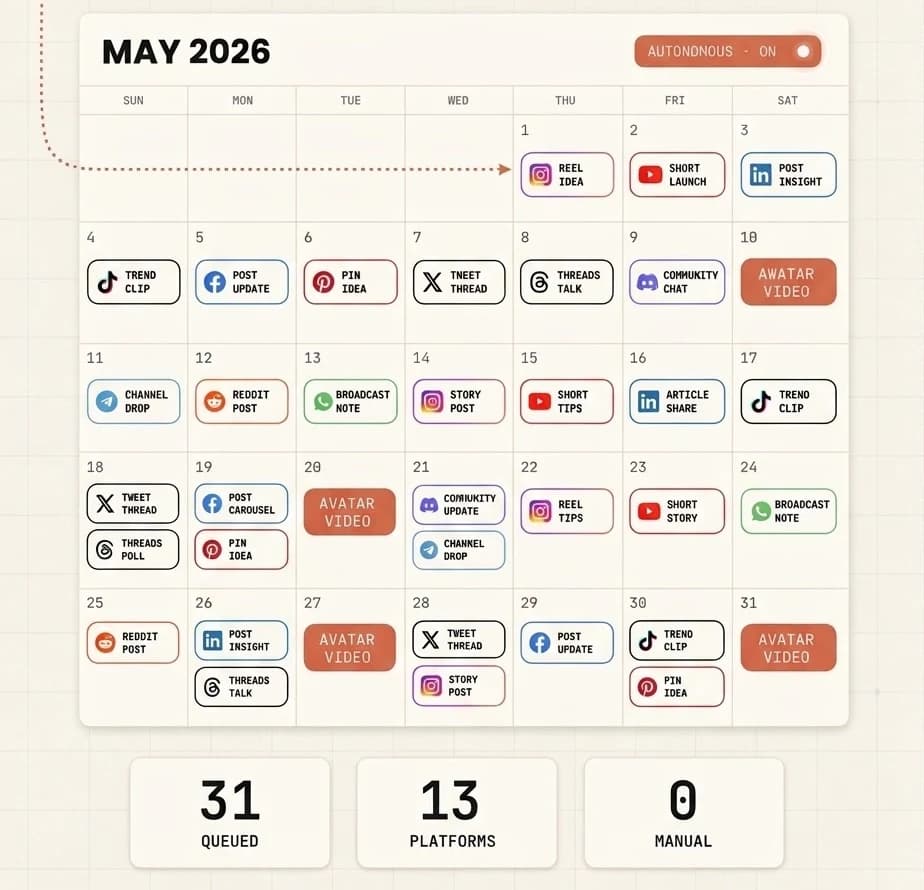
A month planned from one request. Nothing publishes until you have looked at it. What the flow actually looks like The comment-to-DM everyone starts with, and the four nodes that turn it into something worth building. These are the real node names — you will find them under these names in the builder.
comment
Someone comments your keyword on a post
comment_reply
A public reply goes out — three versions, rotating, so it does not read like a bot
follower
Checks whether they follow you, and asks first if they do not
button_message
The DM lands, with the link as a button
delay
Wait a day
condition
Did they open it?
↳ no
message
One nudge, then stop
↳ yes
handoff
The bot goes quiet and it lands in your inbox
Thirty node types in total, including A/B splits, tags, custom fields and an AI agent that answers in your voice. You draw this one from a template in about five minutes.
What the assistant can and cannot do
Worth reading once before you connect, because the answer to “can it do something I did not ask for?” is mostly no, and the exceptions are deliberate.
- It works inside your account, not beside it
- Publishing and scheduling on any connected network, generating and editing images, reading analytics, working the inbox, and creating or editing chatbot automations. 166 tools in total — it is the whole product, not a subset.
- Images are included. Video needs a key of your own
- Generating and editing images is part of your plan and works the moment you connect. Video does not: it needs an API key from a provider — Runway, Veo 3 or Kling for scenes, HeyGen, Creatify or Synthesia for an avatar reading a script — added in Settings first, and you pay that provider directly. Until someone adds one, the assistant will say there is no provider available rather than fail oddly. Video also takes a few minutes rather than arriving instantly, so it hands you a job to check back on.
- Anything that reaches a person asks first
- Sending a DM, replying to a comment, answering a review: those are marked in the protocol as actions with real-world effect, so your assistant checks with you before doing them rather than after.
- There are things it simply cannot reach
- It cannot connect or disconnect social accounts, cannot change your plan, and cannot see anything outside the workspace you approved. Those are not settings you have to remember to turn off.
- Read-only means read-only
- If you approve read-only access, write tools are refused at the server, not merely discouraged in a prompt. It is a good way to let an assistant analyse an account it should not touch.
- A flow it builds starts switched off
- Automations created by an assistant are inactive until you enable them. You can have it read the flow back to you first — the messages, the buttons, the branches, in the order a customer would meet them — and only then turn it on. The one exception is the quick comment-to-DM builder, which is created active because that is the entire point of a one-line shortcut.
- And you can take it back
- Revoke the connection from Settings whenever you want. With the API key route, revoke the key. Either way the assistant loses access immediately — there is nothing cached on its side that keeps working.
Questions people ask
- Do I need a paid Claude plan for this?
- No. Custom connectors work on the free plan, with the limit that a free account can only have one connected at a time. Pro, Max, Team and Enterprise have no such limit. On Team and Enterprise an owner has to add the connector once for the organisation before members can connect to it.
- Can I use ChatGPT or another assistant instead of Claude?
- Any assistant that supports remote MCP servers can connect the same way — the address is the same and so is the sign-in. Claude is the one we test against, so it is the one we can promise works today. If your tool cannot open a browser at all, use the API key route instead.
- Will it post something without me seeing it first?
- Not unless you tell it to. Publishing is a write action, so it is announced before it happens, and in practice assistants ask. If you would rather remove the possibility entirely, approve the connection as read-only and it physically cannot publish.
- I have several brands in different workspaces. Which one does it get?
- The one you pick when you approve the connection, and only that one. If you manage three clients in three workspaces, an assistant connected to the first cannot see or touch the other two. Connect it again for another workspace if you want it to work on that one.
- Can it edit an image I already have, or only make new ones?
- Both. Ask it to change the background, drop in an object, restyle a photo or make a variation of something already in your library, and it edits that image rather than starting from scratch. Either way it comes back as a URL ready to attach to a post.
- What does the assistant actually see of my data?
- Whatever the tools it calls return, within the workspace you approved — posts, analytics, contacts, conversations. It sees no password and no access token for your social accounts, because Ignix does not store those: you authorise each network on the network’s own site.

Ten minutes to set up
And then you can just ask.
Everything above is the part you do once. What comes after is a calendar that fills itself from a sentence, an inbox that answers while you sleep, and an assistant that knows what you sell.
Publish everywhere from one calendar
Fourteen networks, one composer, a preview per network and a check before each post that knows what each one refuses.
Comments that become conversations
A keyword in the comments triggers an automatic DM, and the reply lands in the same inbox as everything else.
An AI that answers as you
Trained on your own documents and site, replying in your voice across every channel, and handing over to a human the moment it should.
And 166 tools for your assistant
The whole product over MCP: schedule, generate, edit, analyse, reply. Read-only if you prefer.
Unlimited contacts, unlimited messages and unlimited automations on every plan. The number that changes between plans is how many accounts you connect — never how much you are allowed to use it.
Plans start at $19 a month. Seven days free and you can cancel in two clicks.
Ten minutes of setup, and then you ask for things instead of doing them.