Guide
How to make money with Ignix by sharing your templates
Build an automation or a video style once, share it, and earn 20% of every customer it brings — every month they stay.
If you have built something in Ignix that works — a comment-to-DM that sends your freebie, a video style people ask you about — other people want it too. Ignix lets you publish it in its public galleries, under your name, and pays you every time it brings in a customer.
It takes five steps and none of them is technical. You join the affiliate program, propose what you built, we review it, and then you share one link: your creator page.
The money is the same as the affiliate program: 20% of each customer’s base plan, every month, for as long as they stay. The templates are simply the easiest way to earn it, because you are not asking anyone to trust a recommendation — you are handing them something that already works.
Join the affiliate program — it is free
ignix.social/affiliates → Join
The program runs on Whop. You sign in with a Whop account (or create one in a minute) and that is it: your Whop username is your affiliate username. Joining costs nothing and there is no minimum audience.
You can earn without ever proposing a template: your link is ignix.social/?a= followed by your username. The rest of this guide is about the link that converts better.
Tip · Write your username down. You will paste it once when you propose your first template and Ignix remembers it after that.
Propose an automation to the gallery
Automations → your automation → Suggest for the gallery
Pick an automation that works for you — the comment-to-DM with your lead magnet, the story-reply that sends a discount, the welcome flow. Click Suggest for the gallery, describe in one sentence what it is for, and add your affiliate username.
What gets shared is the structure: the trigger, the messages, the buttons, the waits and branches. Not your connected accounts, not your posts, not your contacts and not your keys. Someone who uses it gets a switched-off copy in their own account, edits the texts and turns it on. Yours does not change.
Proposing needs an active Ignix plan. Being an affiliate does not.
What the flow actually looks like The comment-to-DM everyone starts with, and the four nodes that turn it into something worth building. These are the real node names — you will find them under these names in the builder.
comment
Someone comments your keyword on a post
comment_reply
A public reply goes out — three versions, rotating, so it does not read like a bot
follower
Checks whether they follow you, and asks first if they do not
button_message
The DM lands, with the link as a button
delay
Wait a day
condition
Did they open it?
↳ no
message
One nudge, then stop
↳ yes
handoff
The bot goes quiet and it lands in your inbox
Thirty node types in total, including A/B splits, tags, custom fields and an AI agent that answers in your voice. You draw this one from a template in about five minutes.
Propose a video style
When you save a look you like in Ignix Editor, it appears under Your styles in Video styles. Press Suggest for the gallery on it, describe it in a sentence and send it. Or ask the assistant that made it — Claude, ChatGPT or Ignix Creator — in plain words:
“Propose my saved video style MY STYLE to the Ignix gallery with my affiliate username yourname.”
The assistant also renders a short preview, strips anything personal from the template and sends it for review with your username. Your footage, your voice and your logo never travel with it: what is shared is the design — layout, motion, type, transitions.
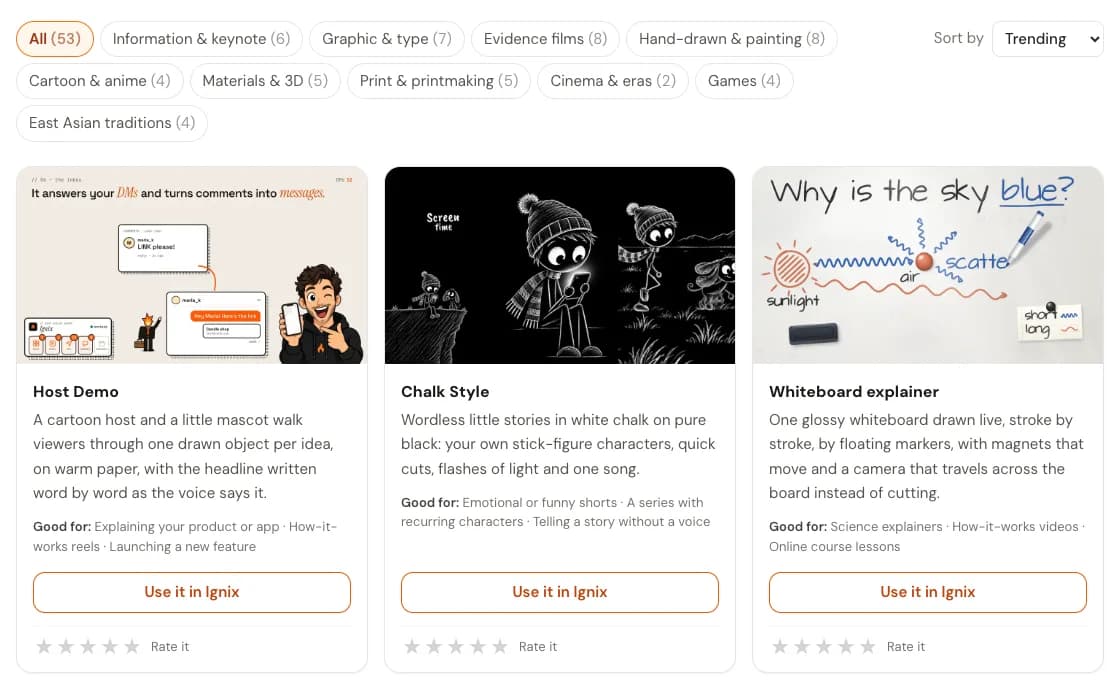
The video styles gallery. Yours goes here, with a preview and your name. We review it, and it goes live with your name
Every proposal is reviewed by a person before anyone sees it. We check three things: that it works, that it carries no personal data — yours or your clients’ — and that anyone can adapt it to their own business.
You see the status next to the template while you wait: pending, approved, or rejected with a note saying what to fix, so you can fix it and send it again. Once approved it appears in the public gallery with your brand name, and people can rate it with stars and sort by trending, newest, best rated or most used.
And from the first approval you have a creator page: ignix.social/c/ followed by your username, with everything you have published.
Share your creator page, and earn
This is the link to share. Put it in your bio, pin it in your Skool, Discord or Whop community, add it under your YouTube videos or at the end of a reel that shows the automation working. Each template also has its own page if you want to point at just one.
Anyone who arrives through your page or one of your templates and subscribes within 90 days counts as yours. If they had clicked another affiliate’s link first, they belong to that affiliate: the first click wins. From then on you earn 20% of the plan they pay, every month, with no cap and no 12-month cut-off.
Example with Blaze ($39/month): $7.80 a month per customer (20%).
- 10 customers$78/mo$936 a year
- 50 customers$390/mo$4,680 a year
- 100 customers$780/mo$9,360 a year
- 250 customers$1,950/mo$23,400 a year
Tip · The templates that get used most are the ones that solve one specific job — “send the price list when someone comments PRICE” — and a description that says exactly that.
Good to know
The small print, said plainly.
- Only the base plan earns commission
- You earn 20% of the plan each customer pays — Spark, Blaze, Scale or Inferno — and it follows them if they change plan. Add-ons (extra accounts, AI credit packs, X seats, extra DMs) do not count, and the commission stops if they cancel.
- What you share stays yours to credit
- A copy someone imports cannot be proposed again by them: the work belongs to whoever built it. If you delete your account, what was approved stays in the gallery, but without your name or your affiliate username.
- Nothing personal travels
- Automations travel without accounts, posts, contacts or keys. Video styles travel without footage, voice, photos or logos. That is also what we check in review.
- Payouts are Whop’s
- Tracking, balances and payouts live in your Whop affiliate dashboard: clicks, sign-ups and commissions, paid under Whop’s terms.
Questions people ask
- Do I need to be an Ignix customer to earn?
- To be an affiliate, no: joining is free and you can share your link today. To propose templates to the galleries, yes, you need an active plan, because the templates are built in Ignix.
- How much can I earn?
- It depends on how many customers you bring and which plan they choose. On Blaze ($39 a month) you earn $7.80 a month per customer: 10 customers is $78 a month, 100 is $780, 250 is $1,950. If a customer cancels, that commission stops; if they change plan, it follows the new one.
- Where do I find my creator page?
- At ignix.social/c/ followed by your affiliate username, once you have at least one template approved. Inside the app it is at the top of Automations and Video styles, ready to copy.
- Can I share a template with one person without publishing it?
- Yes. Every automation has a Share button that creates a private link: whoever opens it gets a switched-off copy. Private links do not go through review and do not appear in the gallery.
- What if my proposal is rejected?
- You see the reason next to it. Fix what it says — usually a personal detail left in a message, or a description that does not say what it is for — and propose it again.

Build once, earn every month
Turn what already works for you into income.
The automation that answers your DMs and the style your reels are made in are already paying off for you. Shared, they can pay off every month for as long as the people they bring stay.
20% recurring, for life
Every payment of every customer’s base plan, with no cap and no 12-month cut-off.
Your name in the gallery
Public galleries with stars, sorting and your brand on every template you publish.
One page to share
Your creator page collects everything you have approved under one link.
Nothing personal shared
Structure and design only. Accounts, contacts, footage and keys never travel.
Join the affiliate program for free, and propose your first template from any Ignix plan, from $19 a month.
Joining is free. You earn 20% of every payment, for as long as they stay.
Commission follows the base plan each customer actually pays.